
The question developers used to ask was whether local AI models were good enough to be useful. In 2026 the question has shifted: are they good enough to replace a Copilot subscription entirely? For most everyday coding work — writing functions, debugging, refactoring, generating tests, explaining unfamiliar code — the answer is yes, provided your hardware is matched to the right model.
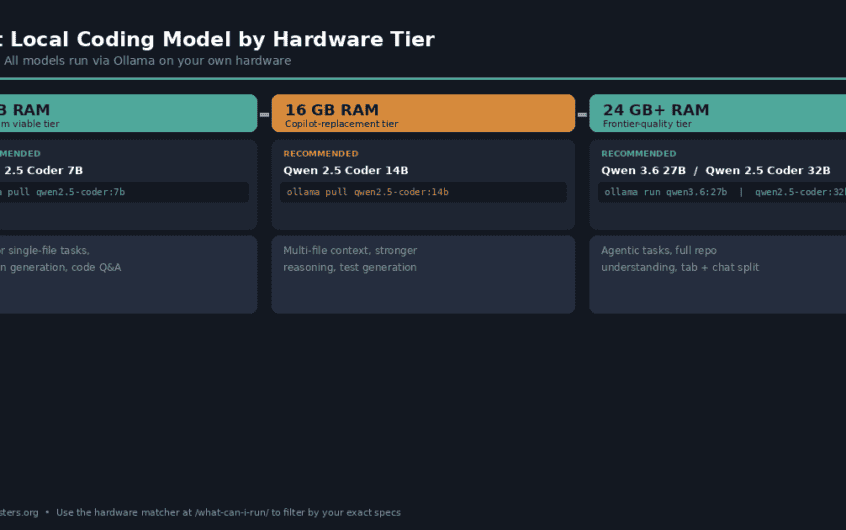
This guide cuts through the options by hardware tier. Whether you’re on a laptop with 8GB of RAM or a workstation with a 24GB GPU, there’s a model that fits your setup and covers your workload. Every model listed below is already in the directory — click through from each pick to check exact RAM requirements and copy the Ollama command for your machine.
Contents
- 1 Quick Reference: Best Coding Model by Hardware Tier
- 2 8 GB RAM: Qwen 2.5 Coder 7B
- 3 16 GB RAM: Qwen 2.5 Coder 14B
- 4 24 GB+ RAM: Two Models for Two Workflows
- 5 Setting Up Your IDE: Continue.dev and Cline
- 6 Tab Completion vs Chat: Use Different Models
- 7 Frequently Asked Questions
- 8 What to Do Next
- 9 Hello, Nice to meet you!
Quick Reference: Best Coding Model by Hardware Tier
| Your RAM | Best pick | Best for | Ollama command |
|---|---|---|---|
| 8 GB | Qwen 2.5 Coder 7B | Everyday coding, chat assistance | ollama pull qwen2.5-coder:7b |
| 16 GB | Qwen 2.5 Coder 14B | Multi-file context, stronger reasoning | ollama pull qwen2.5-coder:14b |
| 24 GB+ (chat/agents) | Qwen 3.6 27B | Agentic tasks, real-world code changes | ollama run qwen3.6:27b |
| 24 GB+ (tab completion) | Qwen 2.5 Coder 32B | Fast, accurate fill-in-middle autocomplete | ollama pull qwen2.5-coder:32b |
| 24 GB+ (alternative) | Gemma 4 26B | Agentic tasks, multimodal, Apache 2.0 | ollama pull gemma4:26b |
Not sure which row you fall into? The hardware matcher filters the full model directory to what your machine can actually run — enter your RAM and it handles the rest.
8 GB RAM: Qwen 2.5 Coder 7B
8GB is the minimum viable tier for a local coding assistant. You’re not going to do deep multi-file refactoring here, but for the majority of single-file tasks — writing a function from a docstring, explaining what a piece of code does, generating a unit test, catching a syntax bug — a well-tuned 7B coding model is genuinely useful, not just a demo.
The pick at this tier is Qwen 2.5 Coder 7B. It was trained specifically on code, giving it a significant edge over general-purpose 7B models for programming tasks. It handles Python, JavaScript, TypeScript, Go, Rust, Java, and C++ well, and it supports fill-in-middle (FIM) for tab-completion workflows in Continue.dev. At Q4_K_M quantization it fits comfortably in 8GB RAM with headroom for the operating system.
ollama pull qwen2.5-coder:7bWhat to expect: Fast responses (CPU-only is workable on modern hardware), solid single-function generation, reasonable code explanation. It will occasionally hallucinate library APIs it hasn’t seen, and it struggles with tasks that require holding many files in context simultaneously. Both of those limitations are a function of size, not this model specifically — they apply to all 7B models.
Alternative at 8 GB: Qwen 3 8B if your work mixes coding with reasoning-heavy tasks (architecture decisions, code review feedback, technical writing). It’s not coding-specialised but its general reasoning quality is noticeably ahead of earlier 8B models, and it handles code well enough for most tasks.
16 GB RAM: Qwen 2.5 Coder 14B
16GB is where local coding models become genuinely competitive with a Copilot subscription for most developers. The jump from 7B to 14B isn’t linear — you’re not just getting a slightly better answer, you’re getting a model that can hold more context, reason about relationships between files, and produce code that requires less manual correction.
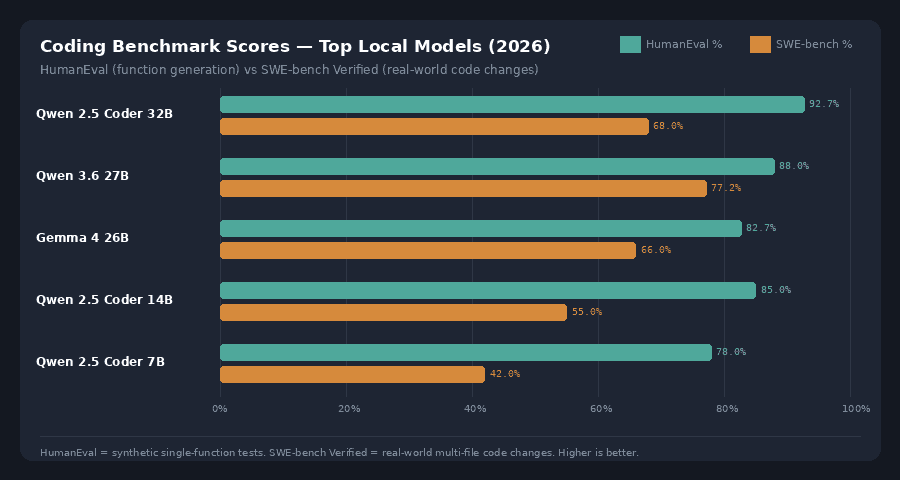
Qwen 2.5 Coder 14B is the consensus pick at this tier. It benchmarks at around 85% on HumanEval — well ahead of comparable general-purpose models at the same size — and handles multi-file context, type inference, and structured output reliably. For a chat-based coding workflow (ask a question, review the response, iterate), this is the model most developers on 16GB hardware should reach for first.
ollama pull qwen2.5-coder:14bWhat to expect: Strong single-file and moderate multi-file performance. It can read a full class definition and write a coherent implementation, catch logical errors in a function, and generate working tests for moderately complex code. Long multi-file agent tasks (spanning 10+ files) are where it starts to degrade — those workloads need the 32GB tier.
If you have 12 GB VRAM and your primary use case is autocomplete only: Codestral 22B by Mistral produces cleaner fill-in-middle completions than anything else at its size. It won’t fit a 16GB RAM CPU-only setup at full precision, but it runs well on a 12GB GPU. If you’re on CPU only, stay with Qwen 2.5 Coder 14B.
24 GB+ RAM: Two Models for Two Workflows
At 24GB and above, the quality ceiling on a single consumer GPU lifts significantly. You can now run 27–32B parameter models, which is where local coding models have made their most dramatic improvements in 2026. The gap between these models and GPT-4o on typical daily coding tasks has largely closed — on the standard HumanEval benchmark, the best local coding models at this tier now score above GPT-4o’s original published figure.
There are two distinct workflows at this tier, and the best model for each is different.
For Chat and Agentic Coding Tasks: Qwen 3.6 27B
Qwen 3.6 27B is the strongest model for tasks that involve reasoning about real codebases — debugging across multiple files, planning a refactor, understanding an unfamiliar codebase, or running as an agent with Cline. It scores 77.2% on SWE-bench Verified, which tests actual multi-file code changes rather than synthetic single-function generation. That benchmark is a much better predictor of production coding performance than HumanEval alone.
ollama run qwen3.6:27bAt Q4 quantization it needs around 22GB, which means it fits a single 24GB card with just enough room to operate. If you have 32GB, run it at Q6 for a noticeable quality improvement on complex tasks.
For Tab Completion and Fill-in-Middle: Qwen 2.5 Coder 32B
Qwen 2.5 Coder 32B is the better choice if your primary workflow is inline autocomplete in an IDE rather than chat-based assistance. It was trained with fill-in-middle as a first-class objective, and in practice produces completions that feel closer to a well-tuned Copilot than any other local model. It scores 92.7% on HumanEval and carries a 128K context window.
ollama pull qwen2.5-coder:32bAt Q4 it needs around 20GB, so it fits a 24GB card comfortably. Many developers at this tier run both: Qwen 2.5 Coder 32B pointed at Continue.dev’s autocomplete model slot, and Qwen 3.6 27B for the chat panel. The two don’t need to run simultaneously — swap between them depending on the task.
Strong Alternative at 24 GB+: Gemma 4 26B
Gemma 4 26B is worth serious consideration if you want a second opinion model or if your workflow involves multimodal inputs — reading a screenshot of a UI, parsing a PDF API spec, or working with image assets alongside code. It’s a Mixture-of-Experts architecture with only around 3.8 billion active parameters per inference step, which makes it considerably faster than its 26B total parameter count suggests.
ollama pull gemma4:26bIt benchmarks within 2% of the larger Gemma 4 31B Dense on most coding tasks, and it’s released under Apache 2.0 — fully commercial use permitted. If the Qwen family doesn’t fit your licensing requirements, Gemma 4 26B is the next best option at this hardware tier.
Setting Up Your IDE: Continue.dev and Cline
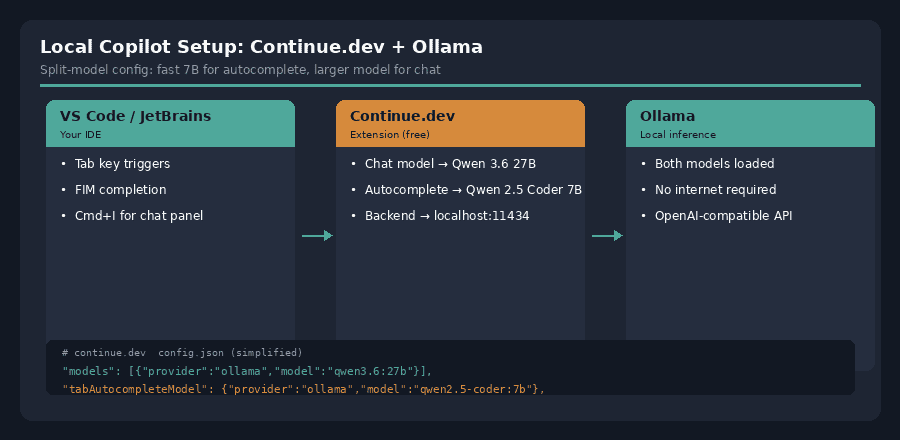
Running a model with Ollama is the first step. Getting it integrated into your editor is what makes the setup feel like a real Copilot replacement. Two tools cover the two main workflows.
Continue.dev — for Chat and Autocomplete
Continue is a VS Code and JetBrains extension that connects directly to an Ollama backend. It adds a chat panel alongside your editor and handles inline tab-completion. The important configuration detail: you can point the chat model and the autocomplete model at different models. A practical split at 16GB RAM is to use Qwen 2.5 Coder 14B for the chat panel and Qwen 2.5 Coder 7B (base variant, not instruct) for autocomplete, where the smaller model’s faster response time matters more than reasoning depth.
In Continue’s config.json, set "apiBase": "http://localhost:11434" and "provider": "ollama" for both model slots. The full setup takes about ten minutes and is covered in our getting started guide.
Cline — for Autonomous Agentic Tasks
Cline is a VS Code extension that acts as an autonomous coding agent — it can read your full repository, write files, run terminal commands, and iterate on bugs across multiple files, all using a local Ollama or LM Studio backend. Point it at http://localhost:11434/v1 and select your loaded model.
Cline works best with the larger models at the 24GB+ tier — agentic tasks that span many files require the model to hold a coherent plan across a long context, which 7B and 14B models struggle to do reliably. If you’re on 16GB RAM, use Cline for bounded tasks (fix this specific bug, add tests to this file) rather than open-ended repository-wide changes.
Tab Completion vs Chat: Use Different Models
One decision that meaningfully improves the local coding experience once you have Ollama running: separate your autocomplete model from your chat model. They have different requirements.
Tab completion needs to be fast above all else. A suggestion that arrives in 3 seconds interrupts your typing flow. Use the smallest model that produces acceptable completions — typically the 7B base (not instruct) variant of your preferred coding model, with FIM enabled.
Chat assistance can take 10–30 seconds to respond and you won’t notice, because you’ve moved your hands off the keyboard to read the response. Use the largest model your RAM supports for chat. The quality difference between a 7B and a 14B response is immediately apparent in a chat context in a way it isn’t for a four-word tab completion.
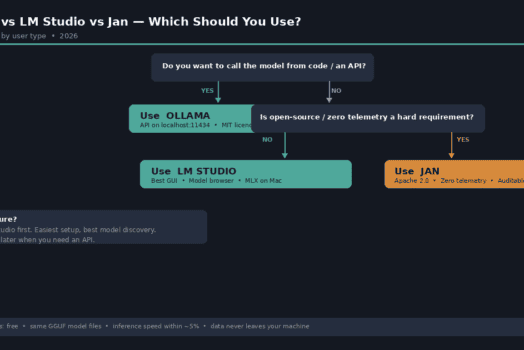
Continue.dev’s split-model configuration makes this two-model setup straightforward. The LM Studio guide covers how to run models as a local API that Continue can use as a backend if you prefer LM Studio’s interface to Ollama’s CLI.
Frequently Asked Questions
Can a local model actually replace GitHub Copilot?
For most everyday coding tasks — autocomplete, chat assistance, test generation, code explanation — yes, if you’re on 16GB RAM or above. The main trade-off is setup time versus Copilot’s zero-configuration experience. The quality gap that existed two years ago has largely closed at the 14B and 32B tiers.
What’s the difference between a coding model and a general model?
Coding-specific models (the Qwen Coder series, Codestral, DeepSeek Coder) are fine-tuned on large code corpora and trained with fill-in-middle as an explicit objective. For pure coding tasks they outperform same-size general models. For mixed workflows — writing a commit message, explaining a concept, answering a question about an API — a general-purpose model often holds its own. If 90% of your AI usage is code, use a coding model. If you want one model for everything, consider Qwen 3.6 27B at the 24GB tier, which is strong on both.
Does RAM or VRAM matter more?
VRAM if you have a discrete GPU, because models run there are 4–8× faster than CPU-only inference. System RAM if you don’t — in that case the full model runs on CPU, which is slower but fully functional. Use the hardware matcher to filter models by your specific setup.
Should I use the instruct or base variant?
Instruct for the chat panel in Continue or for direct Ollama chat. Base for the autocomplete slot — base models are trained to complete text rather than follow instructions, which makes them better at predicting your next line of code without wrapping the answer in conversational formatting.
What about DeepSeek Coder V3?
DeepSeek Coder V3 posts strong benchmark numbers — it competes with frontier closed models on HumanEval and SWE-bench. The constraint is size: running it at full quality requires hardware well beyond a single 24GB consumer GPU. It’s the right choice if you have access to a high-memory workstation or are willing to accept slower CPU inference. For single-GPU consumer setups, the Qwen models at 27–32B parameters are the practical picks.
What to Do Next
- Find your exact setup’s limit: Use the hardware matcher to filter models by your RAM — it shows everything your machine can run, not just the picks in this article.
- Compare models side by side: The compare tool lets you put any two or three models from the directory next to each other on parameters, RAM requirements, context length, and benchmark scores.
- New to running models locally? Start with Getting Started with Local AI for a complete walkthrough of the tooling, then come back here once Ollama is running.
- Prefer a GUI over the terminal? The LM Studio guide covers how to run any of the models above through a desktop interface, with no command line required.